Introduction
Remote bookkeeping depends on connected systems that let financial work happen accurately without a shared office. A bookkeeper needs more than an accounting platform. They also need reliable document capture, payment workflows, client communication, security controls, and reporting tools that work across locations.
The best bookkeeping software 2026 options reduce duplicate entries and make month-end work easier to review. The right stack also gives clients visibility without granting them unnecessary access to sensitive records. Tool selection should reflect the client’s transaction volume, industry, payroll needs, reporting expectations, and existing systems.
This guide explains the software categories remote bookkeepers use most, what each tool does well, and how to build a practical workflow that does not create more administrative work than it removes.
The Modern Remote Bookkeeping Stack
Most remote bookkeepers use a central accounting system connected to specialized tools. The accounting platform remains the source of truth for the general ledger, reconciliations, accounts payable, accounts receivable, and financial statements. Connected applications handle tasks that would otherwise require chasing emails, downloading receipts, or entering data manually.
A useful stack does not need to be large. A solo bookkeeper managing service businesses may work efficiently with QuickBooks Online, Dext, Gusto, and Google Workspace. A firm serving e-commerce clients may add A2X, Shopify, Stripe, and inventory reporting tools. Each addition should solve a defined workflow problem.
Integration quality matters more than a long feature list. Before adopting a tool, confirm which data transfers automatically, how often it syncs, whether edits flow both ways, and how errors are flagged. A weak integration can create duplicate transactions, broken account mappings, and reconciliation delays.
Core Platform Choices
QuickBooks Online remains widely used by small businesses, accountants, and outsourced bookkeeping firms. Its broad app marketplace, bank connections, accountant access, and familiar reporting make it a practical fit for many clients. Remote bookkeepers often use QuickBooks Online Accountant to switch between client files, review exceptions, and manage access from one dashboard.
Xero is another leading choice, particularly for businesses that need strong bank feeds, straightforward collaboration, and multi-currency support. It allows unlimited users on many plans, which can help clients involve owners, managers, and advisers without purchasing separate user seats. Its bank reconciliation screen is especially useful for high-volume transaction review.
Zoho Books suits businesses already using Zoho CRM, Zoho Expense, or Zoho Inventory. It offers a connected ecosystem for companies that want sales, invoicing, expenses, and bookkeeping under related applications. FreshBooks is often used by consultants and small service businesses that prioritize easy invoicing and time tracking, although more complex reporting needs may require another platform.
Larger clients may use Sage Intacct, NetSuite, or Microsoft Dynamics 365 Business Central. These systems support deeper controls, dimensions, approval rules, and multi-entity reporting. A remote bookkeeper working in enterprise software needs clear documentation because processes are usually more customized than they are in small business platforms.
Transaction Capture And Expense Management
Receipt collection is one of the most common friction points in remote work. Dext, Hubdoc, and AutoEntry capture supplier invoices and receipts through mobile uploads, email forwarding, and direct supplier connections. The tools extract key details such as supplier name, date, total, tax amount, and payment method before sending the record to the accounting system.
The best process assigns each client a dedicated receipt submission method. For example, a contractor can photograph fuel receipts in a mobile app, while a professional services firm can forward vendor invoices to a unique email address. This prevents receipts from being buried in personal inboxes or sent through informal chat messages.
Expense management platforms such as Expensify, Ramp, Brex, and Airwallex can add controls around employee spending. They match card transactions to receipts, route expenses for approval, and apply category rules. Remote bookkeepers should review the coding logic regularly because automated suggestions can be wrong after a vendor changes its billing pattern.
Document capture should support audit readiness, not just faster entry. A transaction with a readable source document, correct tax treatment, and a clear business purpose is easier to defend and easier for another team member to review later.
Payment, Payroll, And Cash Flow Tools
Accounts payable tools reduce the back-and-forth involved in collecting approvals and scheduling vendor payments. BILL is frequently used for invoice routing, payment approvals, and vendor management. It works well for clients with multiple approvers or recurring supplier payments. Melio is often a simpler option for smaller businesses that need to pay vendors by bank transfer or card.
Remote bookkeepers should separate bill entry from payment authority. A bookkeeper may enter, code, and prepare bills, while a business owner approves and releases payments. This separation reduces the risk of unauthorized disbursements and gives clients a clear approval trail.
For payroll, Gusto is common among small and midsize United States businesses because it combines payroll processing, tax filings, employee onboarding, and basic human resources features. ADP, Paychex, Rippling, and Deel may suit larger teams, international workers, or more complex compliance needs. Payroll entries should be reconciled to payroll reports each pay period rather than accepted as a single automated journal entry.
Cash flow tools can help bookkeepers move from historical reporting to forward planning. Float, Fathom, and Jirav can project cash based on invoices, bills, payroll, and planned spending. Their forecasts are only useful when the underlying receivables and payables are current, so bookkeeping quality remains the foundation.
Collaboration And Practice Management
Email alone is rarely enough for managing client requests. Remote bookkeepers need a place to track outstanding questions, missing documents, approvals, and recurring close tasks. Karbon, TaxDome, Canopy, and Financial Cents are popular practice management platforms for accounting firms. They centralize client communication, workflow templates, due dates, and internal assignments.
ClickUp, Asana, and Monday.com are flexible alternatives for independent bookkeepers or small teams. A monthly workflow can include bank reconciliation, credit card review, receipt follow-up, payroll review, accounts receivable checks, financial statement preparation, and client review. Assigning each task to a person and a deadline makes delays visible before month-end.
Google Workspace and Microsoft 365 remain essential for shared files, calendars, secure email, and client meeting notes. A shared folder structure should be consistent across every client. For example, separate folders for bank statements, payroll reports, sales tax records, loan documents, and monthly financial packages make handovers much easier.
Messaging tools such as Slack and Microsoft Teams can speed up internal collaboration, but they should not become the only record of financial decisions. Important client approvals, coding decisions, and policy changes should be documented in the accounting file, practice management tool, or a controlled shared document.
Security And Client Access
Remote bookkeeping creates more access points than office-based work. Bookkeepers may log in from home networks, travel locations, client portals, and mobile devices. Strong security practices protect financial data while keeping daily work efficient.
Every major system should use multi-factor authentication. Password managers such as 1Password, Bitwarden, and LastPass help teams create unique credentials without sharing passwords by email or spreadsheet. Client access should be role-based, meaning each person receives only the permissions needed for their work.
Accounting platforms usually allow bookkeepers to add users with limited roles. For example, an accounts payable clerk may create bills but not release payments. A client manager may view reports but not see payroll details. Review access at least twice a year and immediately remove access when a contractor or employee leaves.
Avoid requesting client bank passwords. Use bank feeds, accountant access, or read-only credentials where possible. This protects both parties and creates a clearer record of who accessed financial systems.
Reporting And Advisory Software
Standard profit and loss statements and balance sheets answer basic questions, but many clients need clearer performance insight. Fathom, Syft Analytics, Reach Reporting, and Jirav turn accounting data into visual reports, cash projections, key performance indicators, and board-ready presentations.
Remote bookkeepers can use these tools to highlight trends that may be missed in raw reports. For example, a client may see growing revenue but not notice that accounts receivable are taking longer to collect. A report showing days sales outstanding alongside monthly cash flow can prompt a useful discussion about payment terms and collection follow-up.
Reporting tools need clean source data. Before publishing a dashboard, confirm that bank accounts are reconciled, uncategorized transactions are resolved, loan balances match statements, and income is recorded in the correct period. Attractive charts cannot compensate for inaccurate books.
Selection Checklist
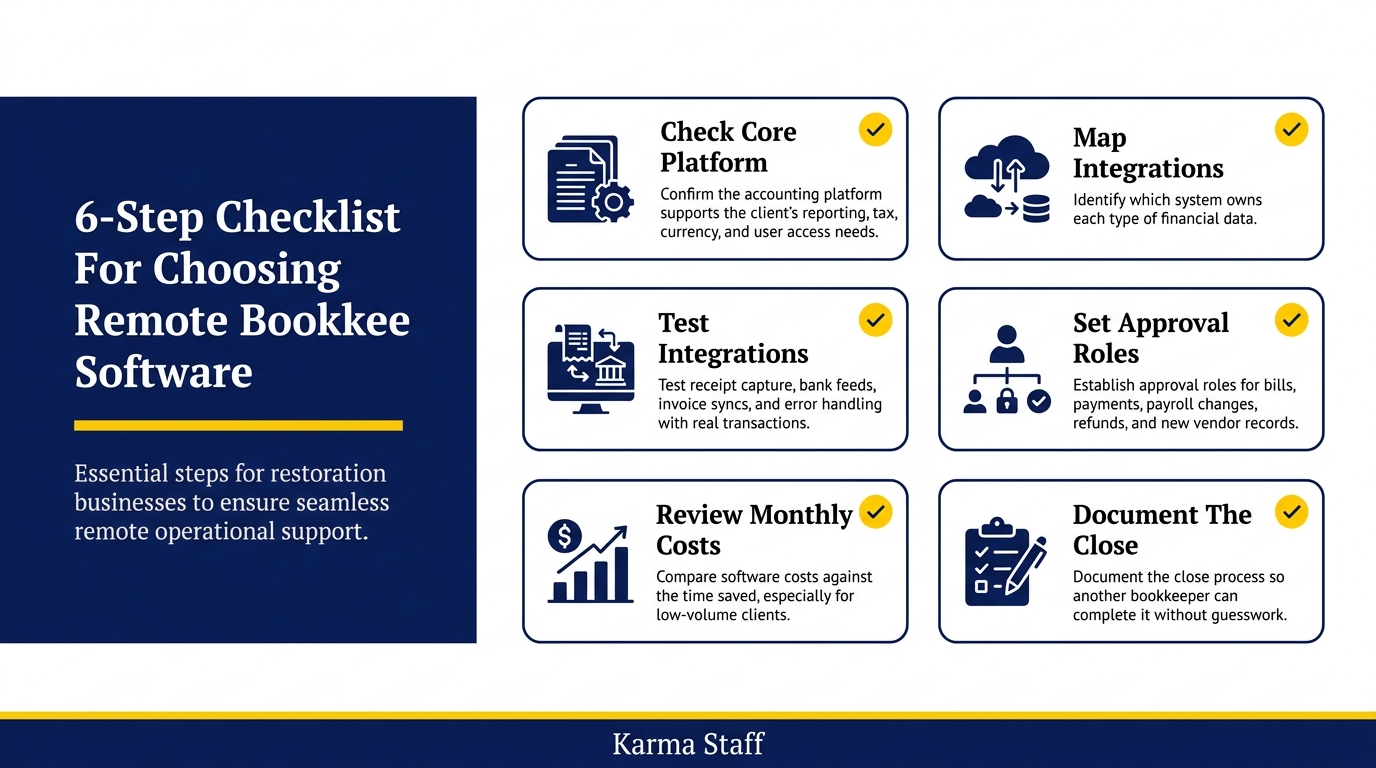
A strong software stack fits the client’s workflow and creates clear accountability. Test the operational details before committing to annual subscriptions or moving historical data.
– Confirm the accounting platform supports the client’s reporting, tax, currency, and user access needs.
– Map every integration and identify which system owns each type of financial data.
– Test receipt capture, bank feed reliability, invoice syncs, and error handling with real transactions.
– Set approval roles for bills, payments, payroll changes, refunds, and new vendor records.
– Review monthly costs against time saved, especially for low-volume clients.
– Document the close process so another bookkeeper can complete it without guesswork.
Start with the core accounting platform and add tools only after a specific bottleneck appears.
Conclusion
Remote bookkeepers work best with systems that connect cleanly and support disciplined processes. The accounting platform should hold accurate records, while specialized applications handle receipt capture, payments, payroll, communication, and reporting.
Cloud accounting tools make it possible to serve clients quickly across locations, but they do not replace review procedures. Reconciliations, approval controls, source documents, and clear task ownership still determine whether financial records are dependable. Choose software based on the client’s actual workflow, then review the stack as transaction volume and business needs change.
FAQs
Q: What is the most common accounting software for remote bookkeepers in 2026?
A: QuickBooks Online is the most common choice for many small businesses and outsourced bookkeeping firms. Xero is also widely used, especially for businesses needing multi-currency support or broad user access.
Q: Do remote bookkeepers need document capture software?
A: Document capture software is highly useful for clients with regular supplier invoices, receipts, or employee expenses. Tools such as Dext and Hubdoc reduce manual entry and create a more complete record for each transaction.
Q: How many tools should a remote bookkeeper use?
A: Use only the tools needed to solve a defined workflow issue. Many small clients need an accounting platform, receipt capture, payroll, secure communication, and task tracking. Add more software only when it saves measurable time or improves controls.
related news & insights.

Accurate books give business owners a clear view of cash flow, margins, tax obligations, and available funds. A remote provider can reduce administrative work while giving you access to skilled bookkeeping support without hiring a full internal finance team. The right partner does more than
-
Small business owners often manage sales, customer service, suppliers, and operations while trying to keep their finances current. Bookkeeping can become a task completed late at night, rushed before a tax deadline, or handled only when a bank balance raises concern. That approach leaves too