Payroll and tax work leave little room for guesswork. Employees expect accurate pay on time, while tax agencies expect correct filings and payments by fixed deadlines. A missed payroll cutoff or an incorrect tax code can create expensive corrections, employee frustration, and avoidable notices.
The task is not primarily about entering numbers into software. It depends on disciplined records, clear approval paths, and a reliable monthly routine. Effective remote payroll bookkeeping gives businesses access to those systems without requiring an in-house payroll specialist.
Payroll Is A Controlled Data Flow
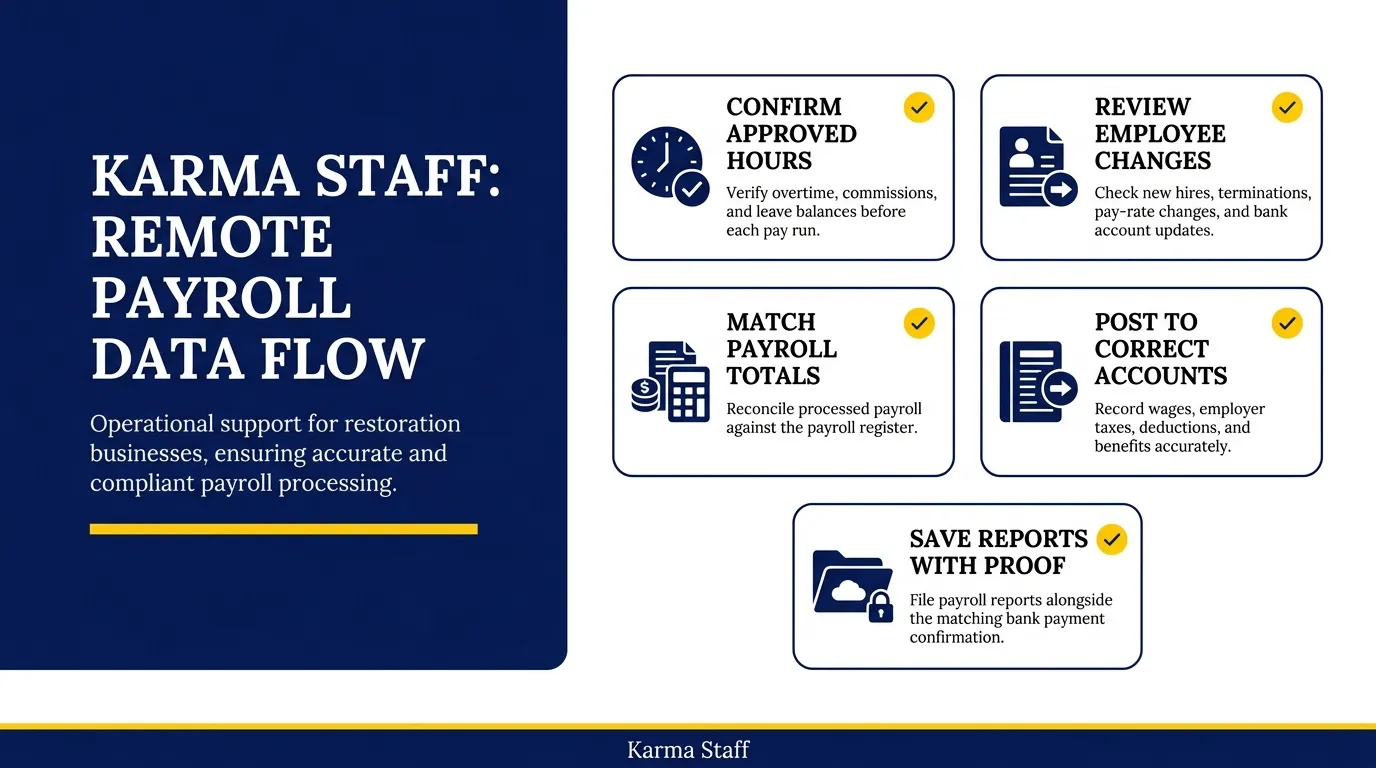
Remote bookkeepers treat payroll as a repeatable flow of approved information, not a last-minute calculation. They collect time, pay, benefit, and employee changes before payroll is processed.
– Confirm approved hours, overtime, commissions, and leave balances before each pay run.
– Review new hires, terminations, pay-rate changes, and bank account updates.
– Match payroll totals to the payroll register after processing.
– Post wages, employer taxes, deductions, and benefits to the correct accounts.
– Save payroll reports with the matching bank payment confirmation.
This workflow creates an audit trail that makes payroll questions easier to answer later.
Building A Practical Payroll Calendar
A payroll calendar prevents deadlines from being managed from memory. It should show both internal approval dates and external filing dates.
– Set a cut-off date for managers to approve employee time records.
– Schedule payroll review at least one business day before submission.
– Add direct deposit processing dates and payroll tax payment deadlines.
– Include quarterly filing dates, annual wage statement dates, and benefit remittance dates.
– Assign one person to approve changes and another to process or review them.
A visible calendar turns recurring payroll obligations into scheduled operational work.
Maintaining Accurate Employee And Contractor Records
Employee records affect payroll, tax withholding, benefit deductions, and year-end reporting. Remote bookkeepers usually maintain a secure record checklist for each worker so missing forms do not surface during tax season.
– Store tax withholding forms, employment agreements, and pay-rate authorizations securely.
– Confirm worker classification before paying someone as an employee or contractor.
– Record state or local tax registration requirements for employees working across jurisdictions.
– Document benefit deductions, retirement contributions, and employer-paid insurance amounts.
– Restrict access to bank details and personal tax information to authorized users only.
Clean worker records reduce correction work during every payroll cycle.
Preparing Tax Returns From Reconciled Books
Tax preparation begins long before a return is drafted. A remote bookkeeper keeps the books current so income, expenses, payroll liabilities, and owner transactions can be reviewed without rebuilding months of records.
– Reconcile bank and credit card accounts to identify missing or duplicate transactions.
– Match payroll tax liabilities in the ledger to filed returns and payment confirmations.
– Separate owner draws, loan payments, asset purchases, and personal expenses from operating costs.
– Review uncategorized transactions while source documents are still easy to locate.
– Provide the accountant with year-to-date financial statements and supporting schedules.
Reconciled books give the tax preparer reliable numbers rather than estimates assembled under pressure.
Controls That Prevent Filing Errors
Most payroll and tax errors come from small gaps in review, documentation, or access. Remote work does not create those gaps, but it requires deliberate controls to prevent them.
– Use role-based access so no single user can change employee pay and approve payment alone.
– Require written approval for wage changes, bonuses, and contractor payments.
– Compare payroll tax payments against payroll reports each filing period.
– Keep copies of submitted returns, payment receipts, and agency notices in one secure folder.
– Review agency correspondence promptly, even if a payment has already been made.
Strong controls make errors easier to catch before they become penalties or amended filings.
Choosing Software And Access Boundaries
The right software should connect payroll, bookkeeping, document storage, and tax reporting without giving every user unrestricted access. A remote bookkeeper needs enough access to reconcile and report, while business owners should retain control of bank accounts and final payroll approval.
– Use payroll software that produces detailed registers and tax filing reports.
– Connect payroll journals to the accounting system or import them consistently.
– Enable multi-factor authentication for payroll, banking, and document storage platforms.
– Avoid sharing passwords through email, chat messages, or shared spreadsheets.
– Review user access after staff departures, role changes, or accountant transitions.
Clear access boundaries protect sensitive data while allowing the bookkeeping process to move quickly.
Conclusion
Efficient payroll and tax work relies on timely approvals, reconciled records, secure systems, and documented review steps. Virtual tax preparation becomes faster and more accurate when the underlying books already explain every major balance.
If payroll reports do not match the ledger, tax payments are hard to trace, or year-end records require a scramble, work with a qualified remote bookkeeper before the next filing deadline.
FAQs
Q: Can a Remote Bookkeeper Run Payroll Directly?
A: Yes. A remote bookkeeper can process payroll through authorized software, provided the business has clear approval procedures for hours, pay changes, and final submission.
Q: What Payroll Records Should A Business Keep?
A: Keep payroll registers, employee tax forms, time approvals, payment confirmations, tax filings, benefit records, and correspondence from tax agencies. Retention requirements vary by location.
Q: Does a Remote Bookkeeper File Business Tax Returns?
A: Some bookkeepers prepare tax-ready financial records but do not file returns. Tax return filing may be handled by a licensed tax professional, accountant, or enrolled agent.
related news & insights.

Accurate books give business owners a clear view of cash flow, margins, tax obligations, and available funds. A remote provider can reduce administrative work while giving you access to skilled bookkeeping support without hiring a full internal finance team. The right partner does more than
-
Small business owners often manage sales, customer service, suppliers, and operations while trying to keep their finances current. Bookkeeping can become a task completed late at night, rushed before a tax deadline, or handled only when a bank balance raises concern. That approach leaves too