Office work rarely gets delayed because a team lacks software. It gets delayed because information arrives in different places, routine decisions wait for approval, and someone has to turn rough notes into usable records. AI can reduce that friction, but only when the task is repetitive enough to guide and important enough to review. The useful question is not whether to add AI. It is which parts of an administrator’s day should move faster without becoming less reliable.
TL;DR
– Start with one recurring task that already has a clear input, expected output, and human owner.
– Use AI to draft, sort, summarize, and check patterns; keep people responsible for decisions and approvals.
– Give the tool approved examples before judging its output, or it will reflect the inconsistency already in the process.
– Run a short pilot beside the current workflow before making AI part of the team’s daily routine.
– Keep sensitive records, unclear requests, and exceptions with an administrator who understands the business context.
AI Changes the First Draft, Not the Responsibility
The future of office administration is less about removing administrative work than reducing the time spent preparing it. An administrator still has to understand what a request means, notice what is missing, and decide who needs an answer. AI is most useful before that judgment: it can turn meeting notes into a task list, organize repeated questions, or prepare a first version of a routine message.
That distinction matters because a polished draft can still be wrong. A tool may sound certain while missing a detail that an experienced administrator would catch immediately, such as an incomplete job file, an unclear deadline, or a request that needs escalation. The work does not disappear. It shifts from creating every item from scratch to reviewing the items that move through the office.
The strongest use cases have a defined starting point and a defined finish. A rough note becomes a formatted summary. A group of emails becomes a list of open actions. A recurring request becomes a draft response based on an approved format. If the task has no consistent input, no owner, or no standard for a good result, AI will expose that weakness rather than solve it.
Choose the Work That Loses Time in Small Pieces
Start with recurring administrative tasks that follow a clear pattern and require little judgment. AI can help with drafting, organizing, routing, and checking, while decisions involving clients, exceptions, or business commitments should remain with a responsible person.
Good tasks to start with include:
- Turning call notes into follow-up tasks.
- Drafting routine emails from approved templates.
- Summarizing long message threads.
- Sorting requests by topic, urgency, or owner.
- Creating checklists from established office procedures.
Avoid starting with tasks involving sensitive records, negotiation, or complex exceptions.
A Repeated Task Still Needs a Clear Standard
Before implementing AI, define what a good result looks like and document the required details, a clear example, and when the task should be handed to a person. This gives the tool and reviewer a consistent standard to follow.
Give the Tool a Narrow Job and a Human Owner
Every AI task needs one person who checks the output before it affects a client, a schedule, or a record. That owner is not there to retype the work. They are there to catch missing context, correct errors, and decide when the request falls outside the tool’s job.
AI tools for administrators work better when the instruction is narrow. “Write an email” leaves too much open. “Draft a follow-up that confirms the appointment window, lists the documents still needed, and asks one direct question” gives the tool a workable assignment. The administrator can then compare the draft against the actual request.
Set the boundaries before a pilot begins. Decide which information can be used, which records stay outside the tool, and which types of output always need review. A team should also agree on what happens when the tool gives an uncertain, incomplete, or unsuitable result. Without that rule, people either trust it too quickly or stop using it after one bad draft.
The goal is not to make administrators dependent on a tool. It is to give them more time for work that requires follow-through, judgment, and coordination.
Build a Pilot Around One Office Bottleneck
Test one workflow from start to finish before expanding AI across the office. A narrow pilot reveals whether the tool saves time in practice or simply moves the work into a new review step.
Choose a task with enough volume to test, but not one that creates a serious consequence if the draft needs correction. For example, an office might test whether AI can turn internal meeting notes into a standard action list. The administrator would still compare the list with the notes, assign owners, and correct anything unclear.
Use the pilot to answer practical questions:
– Does the output match the office’s existing format?
– Can an administrator review it faster than creating it manually?
– Which details are routinely missed or misunderstood?
– Does the tool create new follow-up work for someone else?
– Can the process be explained clearly to a new team member?
Keep the existing method available during the test. That makes it easier to compare the result without forcing staff to work around a half-finished change. If the pilot saves time only when the input is unusually clean, the process may need a better intake form before it needs more AI.
Review the Handoff, Not Just the Draft
A draft may look useful on its own and still fail at the handoff. The real test is whether the next person receives enough context to act without asking for the same information again.
Review where the output goes next: into a job file, a calendar, an inbox, a task list, or a client update. If the next person must rewrite it, search for missing details, or guess what it means, the tool has not saved time yet.
Protect Quality When Work Moves Faster
Speed creates value only when the office can still trust the work moving through it. The risk with AI is not merely an obvious mistake. It is a routine-looking error that gets copied into a message, task list, or record because nobody paused to check it.
Set review points where an error would matter most. An administrator may review a drafted message before it goes out, verify names and dates before a task is assigned, or compare a summary with the original notes before a manager acts on it. These checks should be short and tied to a real risk, not added as a vague extra layer.
AI tools for administrators should also have a clear stopping point. If a request includes conflicting information, unusual instructions, or a client concern that needs judgment, the tool should not be pushed to guess. The administrator should take over and resolve the exception directly.
This is where office experience remains essential. A tool can produce a clean sentence. It cannot know which missing detail will delay a job, frustrate a client, or create confusion between departments unless someone has defined that context for it.
Keep the Office Process Usable Without the Tool
Document the workflow in plain language before making it dependent on AI. If the team cannot explain how a request moves from intake to completion, it will struggle to spot when automation has changed the process.
The documentation does not need to be long. It should identify the input, the expected output, the reviewer, and the point where an exception is handed to a person. That structure also helps a remote administrator understand where their work starts and where another person’s responsibility begins.
A simple process record protects the office when staff members change roles, when a tool produces an unusable result, or when a task needs to be completed manually. It also prevents the common mistake of building a workflow around a prompt that only one person understands.
AI should make the process easier to follow, not harder to explain. If the new method cannot be taught clearly, narrow the task until it can.
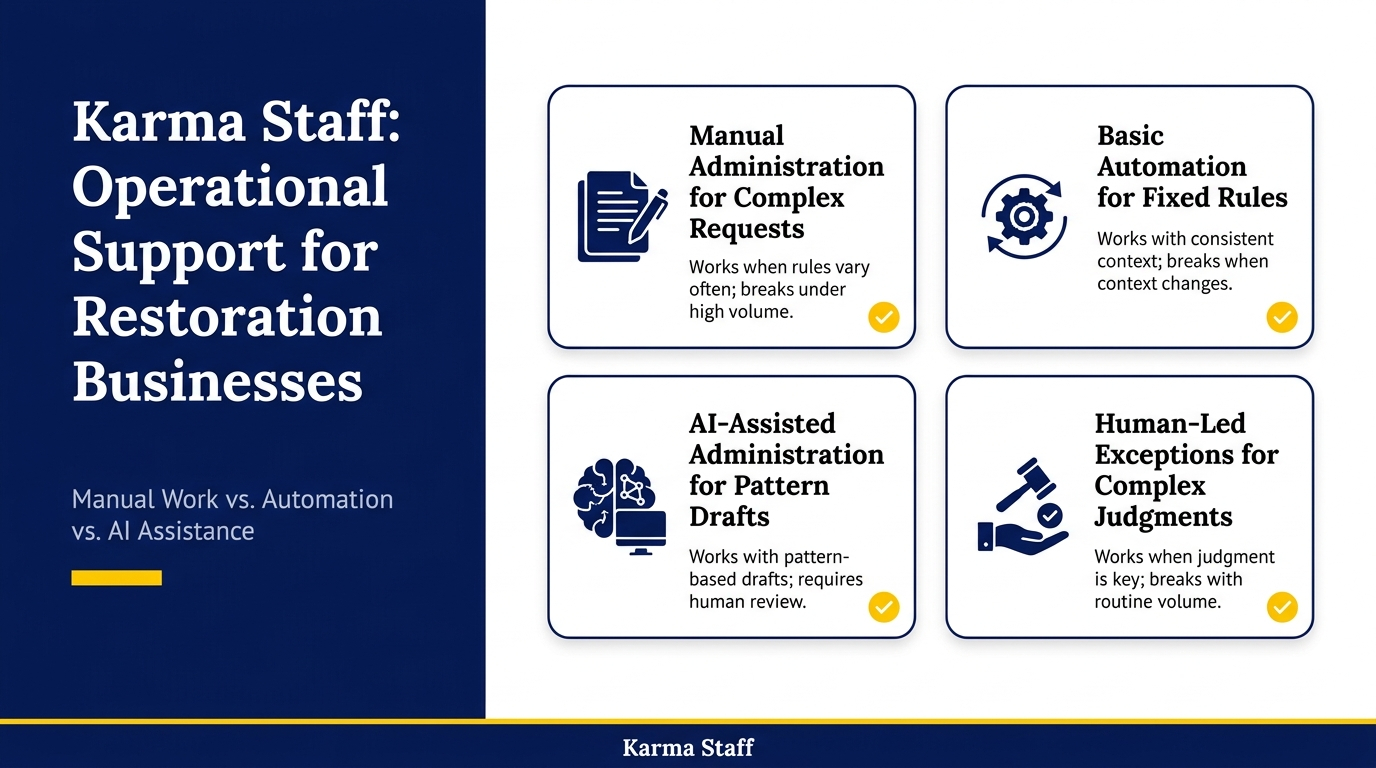
Manual Work, Basic Automation, and AI Assistance Compared
| Option | Works when | Breaks when | Trade-off |
| Manual administration | Requests vary often | Volume grows quickly | More staff time |
| Basic automation | Rules stay fixed | Context changes often | Limited flexibility |
| AI-assisted administration | Drafts follow patterns | Review is skipped | Human oversight |
| Human-led exceptions | Judgment changes outcomes | Volume is routine | Slower first draft |
Final Verdict
If your office spends too much time turning notes, messages, and repeat requests into usable work, the future of office administration starts with one narrow pilot. Move drafting, sorting, and summarizing first; keep approvals, exceptions, and client commitments with the administrator responsible for the outcome. The goal is not less accountability. It is less time lost before accountable work can begin.
AI tools for administrators are worth keeping when the output is easy to review, fits a defined workflow, and reduces repeat handling. If a task still lacks a clear owner or standard, fix that process before adding technology. A capable administrator should be able to explain the workflow, check the result, and take over whenever the request needs human judgment.
FAQs
Q: Which administrative tasks should use AI first?
A: Start with tasks that repeat often and have a clear format, such as summarizing internal notes, organizing open requests, or preparing a first draft from approved information. Avoid tasks that require negotiation, sensitive judgment, or final approval. The administrator should be able to review the output quickly against a known standard.
Q: Will AI replace office administrators?
A: AI can reduce the time spent on routine drafting and sorting, but it does not remove the need for someone to understand the request, spot exceptions, and keep work moving between people. Administrators remain responsible for context, follow-through, and decisions that affect clients or operations.
Q: How can a team tell whether an AI pilot is saving time?
A: Review the whole workflow rather than the draft alone. Compare the time spent creating, reviewing, correcting, and handing off the work. If the tool produces output that needs repeated rewriting or causes more questions downstream, it has not improved the process yet.
Q: What should an administrator review before using AI output?
A: Check names, dates, task owners, missing details, and the tone of any message that will be shared outside the team. Review whether the output reflects the actual request rather than merely sounding complete. If the information is unclear or conflicting, handle it directly instead of asking the tool to guess.
related news & insights.

Office administrators keep daily operations moving. They coordinate calendars, manage records, handle requests, communicate with suppliers, support teams, and solve small problems before they affect the wider business. The role often involves rapid task switching, which can make a full day feel busy without producing
-
Clear communication keeps daily office operations moving. An administrator often sits at the center of schedules, messages, meetings, visitors, records, and urgent requests. That position creates a valuable opportunity to prevent confusion before it affects deadlines, customer service, or team morale. Strong communication is not