Clear communication keeps daily office operations moving. An administrator often sits at the center of schedules, messages, meetings, visitors, records, and urgent requests. That position creates a valuable opportunity to prevent confusion before it affects deadlines, customer service, or team morale.
Strong communication is not about sending more emails or attending more meetings. It is about creating reliable ways for people to receive the right information, understand what they need to do, and know where to find answers later. A useful system also reduces interruptions because staff members do not need to repeatedly ask for basic updates.
Office administrator communication becomes stronger when messages are timely, organized, and matched to the audience. The practical methods below can help an administrator build trust, improve follow through, and make the workplace easier to navigate.
Build A Communication Operating System
An office needs more than informal conversations to stay organized. A communication operating system gives routine updates a predictable home, format, and owner.
Start by mapping the information that moves through the office each week. This may include meeting changes, delivery notices, policy updates, maintenance work, staff events, visitor details, and leadership announcements. Each type of information should have one primary channel. For example, use a shared calendar for room bookings, a team chat channel for same-day changes, and email for decisions that require a record.
Set clear expectations about response times. A chat message may need a reply within an hour, while a nonurgent email may be handled by the next business day. Without these expectations, employees often treat every message as urgent or overlook requests that need quick action.
Keep a central reference point for recurring information. A well-maintained intranet page, shared drive folder, or workspace can hold office procedures, contact lists, supply requests, and event details. Name folders plainly and archive outdated files so staff do not act on old instructions.
Communication Steps For Clear Daily Updates
A short update can create confusion if it lacks context or a clear action. Use a consistent structure so readers can scan and respond quickly.
– State the purpose in the first sentence, such as a schedule change or required action.
– Include the date, time, location, and responsible contact for event-related messages.
– Explain who is affected instead of sending broad notices to people who do not need them.
– Put deadlines in a separate sentence so they are not buried in background details.
– End with the exact next action, such as confirm attendance or submit a request form.
A repeatable message structure helps staff process updates without guessing what matters most.
Match Channels To The Message
Channel choice affects whether an update is seen, understood, and retained. A message about a fire drill should not be handled the same way as a reminder to order stationery.
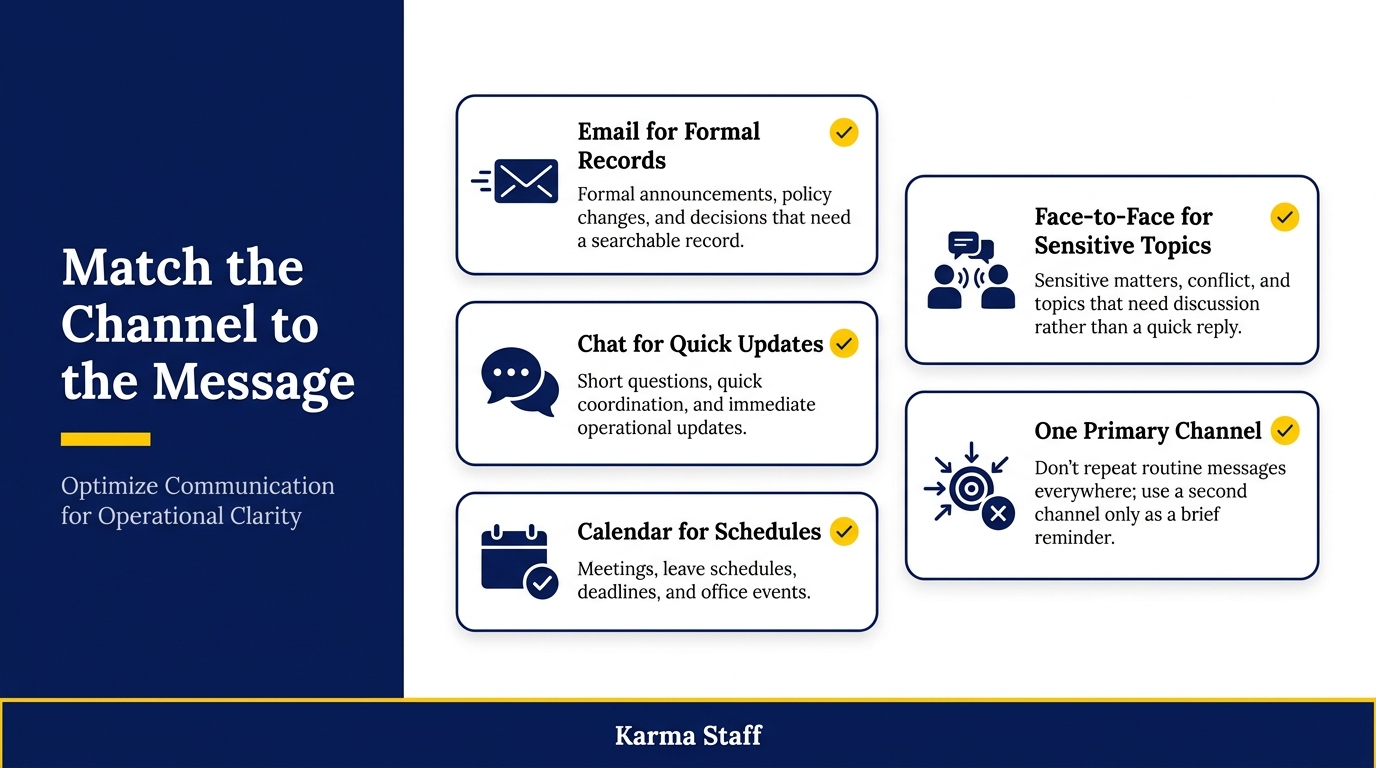
Use email for formal announcements, policy changes, and decisions that require a searchable record. Use team messaging platforms for short questions, quick coordination, and immediate operational updates. Use a shared calendar for meetings, leave schedules, deadlines, and office events. Use face-to-face conversations for sensitive matters, conflict, or topics that need discussion rather than a quick reply.
Avoid distributing the same announcement across every channel unless the issue is genuinely urgent. Repeating routine messages in email, chat, calendar alerts, and printed notices trains people to tune out. Instead, identify the primary channel and use another channel only as a brief reminder.
For example, announce a planned internet outage through email two days ahead. Add the outage to the shared calendar. On the morning of the work, post a short chat reminder with the expected start and end times. Each message serves a different purpose without creating unnecessary noise.
Signs Your Communication Process Needs Attention
Communication problems often appear in small operational failures before they become larger issues. Watch for repeated patterns rather than treating each missed detail as an isolated mistake.
– Staff ask where to find forms, policies, or meeting details that were already shared.
– Meeting rooms are double-booked despite a shared booking process.
– Employees miss deadlines because requests did not identify a due date or owner.
– Leaders receive the same question from multiple people after an announcement.
– Urgent requests arrive through personal messages instead of the agreed team channel.
– Different departments act on conflicting versions of the same update.
These signs show that the process, channel, or message format needs adjustment.
Create Better Meeting Communication
Meetings can either clarify work or create another source of vague tasks. An administrator can improve the outcome by managing communication before, during, and after each session.
Before the meeting, send an agenda that states the purpose, topics, attendees, and preparation required. Send it early enough for participants to review relevant documents. If a decision is required, identify it in the agenda so attendees arrive ready to contribute.
During the meeting, capture decisions, assigned actions, owners, and due dates. Do not rely on broad notes such as “team to review.” Record who will review what, by when, and what result they need to provide. If a discussion produces no decision, note what information is still needed and who will collect it.
After the meeting, send a concise action summary within one business day. Place action items near the top, not at the end of several paragraphs of notes. Update a shared task tracker when the work involves multiple people or a longer timeline. This creates accountability without requiring the administrator to chase every detail manually.
Mistakes That Weaken Administrative Communication
Even well-intended messages can lose effectiveness through small but recurring habits. Correcting these issues makes communication easier to act on.
– Sending long paragraphs without a subject line that explains the message’s purpose.
– Using vague timing words such as “soon” or “later” instead of a specific date and time.
– Sharing confidential details in broad distribution lists or open chat channels.
– Forwarding a request without clarifying the expected action or deadline.
– Changing a process without updating the central document employees rely on.
– Assuming silence means agreement when a decision needs explicit confirmation.
Removing these habits builds confidence in the information that comes from the administration function.
Support Two Way Communication
Effective office communication is not only top-down. Administrators need practical ways to collect questions, feedback, and operational concerns from employees.
Create an accessible route for common requests. A simple form for facilities issues, office supplies, visitor access, or equipment needs provides useful details from the start. It also gives employees a clear alternative to informal messages that may be missed during a busy day.
For broader feedback, ask targeted questions. Instead of asking whether communication is good, ask whether staff can find policies quickly, whether meeting changes arrive early enough, or whether the shared calendar reflects current information. Specific questions produce answers that can lead to process improvements.
Close the loop after feedback is received. If an issue leads to a change, explain what was updated and why. If a request cannot be completed, give a direct reason and, where possible, offer an alternative. Staff are more likely to use formal communication channels when they see that their input receives a response.
Communication Checks Before Sending Important Messages
A two-minute review can prevent avoidable follow-up questions and missed actions. Use this check for announcements, meeting summaries, schedule changes, and cross-department requests.
– Confirm the subject line describes the topic and any required action.
– Check that dates, times, time zones, locations, and links are accurate.
– Verify that the recipients are the people who need the information.
– Make sure the message explains who owns the next step.
– Remove outdated background details that distract from the current request.
– Review attachments and permissions before sending the message.
These checks make each update more reliable and reduce unnecessary back-and-forth.
Measure What Is Working
Communication quality can be measured through operational results, not just opinions. Track the number of repeated questions after announcements, missed meeting actions, late room changes, or incomplete requests. A rise in any of these areas may signal that staff cannot find or interpret key information.
Review these patterns monthly with managers or department leads. If employees repeatedly miss a specific type of update, test a better channel, format, or timing. For instance, a weekly email may be ineffective for same-day changes, while a chat post may be too brief for a new procedure.
Small adjustments create meaningful gains. A standardized meeting summary, clearer request form, or better-maintained shared calendar can save hours of follow-up across a month.
Conclusion
Strong workplace communication is built through dependable routines, not occasional reminders. Administrators add the most value when they make information easy to find, assign clear owners, and select channels that fit the urgency and purpose of each message.
A capable workplace communication admin creates structure without adding bureaucracy. Start with one improvement, such as standardizing meeting summaries or clarifying the channel for urgent requests, then review the results and refine the process.
FAQs
Q: What is the main role of an office administrator in workplace communication?
A: An office administrator organizes the flow of operational information. This includes sharing updates, maintaining calendars and records, coordinating meetings, directing requests to the right people, and ensuring staff can access accurate information.
Q: How can an administrator reduce email overload?
A: Send email only when a formal record, detailed explanation, or broad announcement is needed. Use shared calendars for schedules, team chats for quick coordination, and central documents for information employees may need to reference again.
Q: How often should workplace communication processes be reviewed?
A: Review key processes at least quarterly and after major changes such as new software, office moves, policy updates, or team restructuring. Review sooner if repeated questions, missed deadlines, or conflicting messages begin to appear.
related news & insights.

Office administrators keep daily operations moving. They coordinate calendars, manage records, handle requests, communicate with suppliers, support teams, and solve small problems before they affect the wider business. The role often involves rapid task switching, which can make a full day feel busy without producing
-
Introduction Property restoration work moves quickly. A team may be handling water extraction, documenting fire damage, coordinating vendors, and responding to anxious property owners within the same day. Field crews need to focus on stabilizing the site and completing approved work. Without someone managing the