Office administrators keep daily operations moving. They coordinate calendars, manage records, handle requests, communicate with suppliers, support teams, and solve small problems before they affect the wider business. The role often involves rapid task switching, which can make a full day feel busy without producing clear progress.
Strong performance starts with controlling incoming work rather than reacting to every request as it arrives. Effective office administration time management gives administrators a practical way to protect focus, meet deadlines, and keep routine responsibilities from being pushed aside by urgent interruptions.
Productivity is not about completing tasks at maximum speed. It is about choosing the right task, using a repeatable process, and making sure important details do not get lost. The methods below help office administrators create that control without adding unnecessary complexity.
The Real Workload Behind Admin Performance
An admin workload is rarely limited to a single task list. Requests arrive through email, chat messages, meetings, walk-up conversations, phone calls, and shared systems. Without one reliable place to capture work, priorities become unclear and routine tasks are easy to miss.
A useful first step is to separate work into three categories: urgent issues, scheduled responsibilities, and improvement work. Urgent issues include a meeting room problem or a missing document needed that day. Scheduled responsibilities include weekly reports, invoice processing, and diary management. Improvement work includes updating a filing process or creating a better onboarding template.
This distinction prevents every request from being treated as equally urgent. It also gives managers a clearer view of the actual workload. If daily urgent requests regularly consume most available time, the solution may be a revised process, better request routing, or extra support rather than asking the administrator to work faster.
Create One Trusted Task System
A task system only works if it captures every commitment in one place. It can be a digital task tool, a spreadsheet, or a paper planner. The format matters less than consistent use.
Start by recording each task with a due date, owner, and next action. “Prepare travel arrangements” is too vague. “Request flight options from approved travel provider by 2 PM” makes the next move clear. This reduces the time spent reopening tasks just to work out what needs to happen.
Review the task list at the beginning and end of each day. The morning review identifies the priorities that need protected time. The end-of-day review captures new requests, checks deadlines, and prepares the next day before work finishes. That short routine can prevent mental overload and reduce forgotten follow-ups.
Avoid maintaining separate lists in notebooks, email flags, sticky notes, and chat messages. Multiple lists create duplicate work and make it difficult to see capacity honestly.
Protect Focus With Planned Work Blocks
Office administration roles require availability, but constant availability weakens accuracy and slows complex work. Tasks such as reconciling expenses, preparing reports, updating records, or arranging an event need uninterrupted attention.
Reserve blocks in the calendar for work that requires concentration. A 45-minute period can be enough to complete a focused task if notifications are paused and related files are ready before the block begins. Use shorter blocks for routine actions such as filing, expense coding, or responding to standard queries.
Group similar tasks together. Process invoices in one batch instead of handling each invoice when it arrives. Schedule calendar updates at set points during the day rather than changing appointments every few minutes. This approach reduces the hidden time cost of repeatedly changing systems and reorienting attention.
Share focus periods with colleagues where appropriate. A calendar marked “admin processing time” sets a reasonable expectation that a response may not be immediate. Leave clear routes for genuinely urgent issues, such as a designated phone call or message channel.
Improve The Quality Of Incoming Requests
Poorly defined requests waste time at both ends. An administrator may receive a message asking for “help with the meeting” but still need to ask for the date, attendee list, room requirements, budget, equipment needs, and approval status.
Create simple request templates for recurring work. A meeting request form can ask for the purpose, date options, attendees, room setup, virtual meeting link, catering requirements, and cost centre. A purchase request can require a supplier quote, business reason, budget code, and manager approval.
Templates do not need to be complicated. A shared form, email template, or standard message format can collect the details needed to start work. They also show colleagues what information the admin function needs to deliver a timely result.
For requests that arrive without enough detail, respond with a short list of missing information rather than starting a long email exchange. This protects time and creates a pattern that encourages better requests in the future.
Use Repeatable Processes For Routine Work
Recurring tasks should not be rebuilt from memory each time. Processes for onboarding, meeting preparation, supplier setup, office ordering, and visitor management benefit from clear written instructions.
Document the steps while completing the task. Include where files are stored, who approves decisions, which systems are used, expected deadlines, and common exceptions. Use plain language so another team member can follow the process without needing a separate explanation.
A reliable process also makes delegation easier. If someone covers annual leave or a busy period, they can see the required actions and avoid guessing. This reduces errors that often occur when knowledge is held by one person.
Review processes after a problem, not only during annual reviews. If a supplier invoice was delayed because the approval route was unclear, update the instructions immediately. Small improvements build a more dependable operation over time.
Manage Email Without Letting It Manage The Day
Email can consume an entire day because it combines urgent questions, routine updates, meeting invitations, and information that does not require action. Treating every new message as a priority creates fragmented work and delayed deadlines.
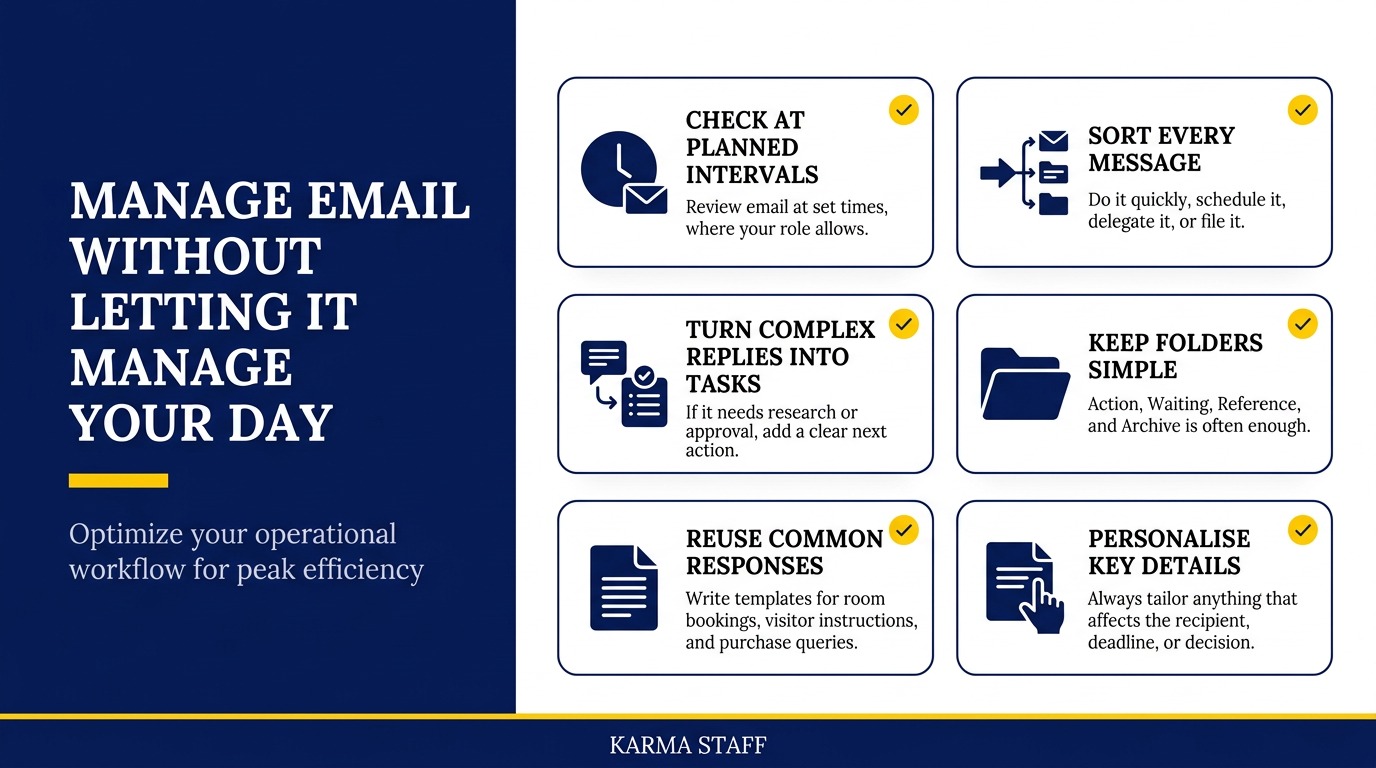
Check email at planned intervals where the role allows it. During each review, sort messages into actions that can be completed quickly, tasks that need scheduling, messages that need delegation, and information that can be filed. If a response needs research or approval, turn it into a task with a clear next action.
Use folders or labels sparingly. A simple structure such as Action, Waiting, Reference, and Archive is often enough. The goal is not a perfectly organised inbox. The goal is knowing what requires attention and what can be safely stored.
Write reusable responses for common requests, including room bookings, visitor instructions, purchase queries, and document sharing. Templates improve speed while keeping communications clear and consistent. Always personalise the detail that affects the recipient, deadline, or decision.
Set Clear Boundaries Around Priority Work
An administrator often becomes the first person people ask for help. That trust is valuable, but it can lead to a workload filled with requests that belong elsewhere. Clear boundaries protect the time needed for core responsibilities.
Use calm, specific language when managing a new request. Instead of saying “I am too busy,” explain the current commitment and offer a realistic time. For example, “I am completing the board pack this morning. I can review this after 2 PM, or I can show you where the template is.”
Escalate competing priorities early. If two senior colleagues request urgent work with the same deadline, ask them to confirm the order of importance. Do not quietly attempt both tasks at once and risk avoidable mistakes.
Regular workload conversations with a manager are also useful. Share completed work, upcoming deadlines, recurring interruptions, and tasks that could be simplified. Evidence from a task system makes these discussions more productive than a general statement about being busy.
Measure What Actually Improves Performance
Productivity improves when administrators can see where time goes and where delays occur. Track a small number of measures that reflect the role, rather than collecting data for its own sake.
Useful measures may include the time taken to process standard requests, the number of incomplete requests received, meeting room utilisation, overdue invoices, or recurring errors in records. Choose measures that reveal a process issue and lead to an action.
For example, if meeting setup requests often arrive less than 24 hours before the event, the answer may be a booking deadline and a clearer request form. If invoice approvals are delayed, a reminder schedule or an alternative approver may solve the issue.
Review patterns monthly. Daily figures can encourage reactive decisions, while a monthly view shows whether a change has made work easier or simply moved the delay to another stage.
Build Productive Working Relationships
Office administrators depend on good working relationships because many tasks require information, approvals, or cooperation from others. Clear communication reduces delays more effectively than repeated reminders.
Learn how key stakeholders prefer to receive information. Some managers need a short summary with a clear decision required. Others need a detailed schedule or supporting documents. Matching the format to the audience reduces follow-up questions and speeds decisions.
Be proactive with predictable deadlines. Send meeting papers early, request approvals before the final day, and remind teams about office events before availability becomes limited. Early communication gives people time to respond without creating last-minute pressure.
Reliability also builds trust. If a colleague knows that an update will arrive at the promised time, they are less likely to send repeated status messages. That reduces interruptions and supports more productive work across the office.
Conclusion
Better admin performance comes from controlling workflow, not trying to respond instantly to everything. A single task system, planned focus time, clearer requests, and repeatable processes create more capacity while protecting accuracy.
Improving productivity in office admin also requires honest prioritisation. Start this week by choosing one recurring task that causes delays, documenting the process, and removing one unnecessary step. Small operational changes often create the most durable results.
FAQs
Q: What is the best way to prioritise office admin tasks?
A: Prioritise work by deadline, business impact, and dependency. Complete tasks that block other people first, then schedule routine responsibilities before they become urgent. Ask a manager to confirm the order when two high-priority requests conflict.
Q: How can an office administrator reduce interruptions?
A: Set planned times for email and routine questions, reserve calendar blocks for focused work, and give colleagues a clear route for genuinely urgent issues. Request forms and standard templates also reduce back-and-forth communication.
Q: Which tools help with office administration time management?
A: A shared calendar, one task list, document storage system, and simple request form are often enough. Choose tools that fit existing team workflows and make deadlines, ownership, and next actions easy to see.
related news & insights.

Office work rarely gets delayed because a team lacks software. It gets delayed because information arrives in different places, routine decisions wait for approval, and someone has to turn rough notes into usable records. AI can reduce that friction, but only when the task is
-
Clear communication keeps daily office operations moving. An administrator often sits at the center of schedules, messages, meetings, visitors, records, and urgent requests. That position creates a valuable opportunity to prevent confusion before it affects deadlines, customer service, or team morale. Strong communication is not